MM logo white 1
MM logo red
Image description is not available

Compare Apple iPads: all models at a glance

Daan21 DECEMBER 2025
Image showing five colourful tablets in a row, different sizes, with vivid abstract screens on a soft light background behind.

Apple has released several iPads: the traditional iPad, iPad mini, iPad Air and iPad Pro. These tablets all have their own unique features to offer you a great user experience. Still, it can sometimes be difficult to determine which Apple tablet suits you. That’s why on this page you can compare the latest generation of iPads to make the right choice.

Compare Apple iPads

Property nameiPad A16 (2025)iPad Air M3 (2025)iPad Pro M5 (2025)iPad mini (2024)
Display

13 and 11 inch Liquid Retina-display

13 and 11 inch Liquid Retina-display

13 and 11 inch Ultra XDR Retina-display + nanotexture

8,3 inch Liquid Retina-display

Storage

128 GB, 256 GB en 512 GB

128 GB, 256 GB, 512 GB en 1 TB

256 GB, 512 GB, 1 TB en 2 TB

128 GB, 256 GB en 512 GB

Processor

A16 Bionic chip

M3-chip

M5-chip

A17 Pro chip

Camera

12 megapixel

12 megapixel

12 megapixel with ProRes

12 megapixel

Connection

USB C

USB C

USB C

USB C

Apple Intelligence

Yes

Yes

Yes

Yes

Type Apple Pencil

Apple Pencil USB C and Apple Pencil (1st generation)

Apple Pencil Pro and Apple Pencil USB C

Apple Pencil Pro and Apple Pencil USB C

Apple Pencil Pro and Apple Pencil USB C

Compatible with Magic Keyboard

Yes

Yes

Yes

No

Wifi + Cellular

Wifi 6e + 5 G

Wifi 6e + 5 G

Wifi 7 + 5 G

Wifi 7 + 5 G

Colour

Silver, blue, pink and yellow

Space grey, starlight, blue, and purple

Space black and silver

Space grey, starlight, blue and purple

iPad: the family favourite

Person relaxing on a brown leather sofa, holding a purple tablet upright, lit by warm light with wooden wall in background.

This iPad is the cheapest and has fewer features than the other iPad models, which makes it ideal for daily use by the whole family. When purchasing an iPad you can choose between 2 generations: iPad 2022 and iPad (2025). The latest iPad has had a considerable upgrade and therefore looks more like the iPad Pro and iPad Air. You can easily connect both iPads to Apple accessories such as the Magic Keyboard Folio and 2 generations of the Apple Pencil, namely the 1st generation USB-C version. This way you can quickly work out short reports or creative ideas.

View the iPad

iPad Air: for students and business users

Woman sitting outside among lush green leaves, drawing on a green tablet with stylus, wearing a soft cosy lilac jumper.

Compared with the iPad Pro, the iPad Air has just slightly fewer features but is equally powerful and fast in use. The iPad Air M3 (2025) is an ideal tablet for students and business users. This generation is equipped with a 12-megapixel camera and Liquid Retina display with True Tone and anti-reflective coating. The slim design with crystal-clear screen and fast processor make this iPad Air suitable for use at home, at work or on the go. Just like the iPad Pro, this tablet can be combined with Apple’s unique keyboard: the Magic Keyboard. This way you can easily work out texts, create the most beautiful designs or put together a clear presentation.

View the Apple iPad Air

iPad Pro: for serious work

Man focused while writing on a dark tablet with stylus, sitting indoors at a table, dressed casually in light jacket and blue jumper.

Are you a creative professional and looking for a versatile tablet for photo or video editing? Then the iPad Pro is the best match for you. Especially if you opt for the iPad Pro M5 (2025). The powerful processor with Apple M5 chip ensures that you can carry out AI tasks for photo and video editing and translations quickly and easily. The battery also charges even faster, so within 30 minutes you have 50% power. In addition, this iPad Pro has an Ultra Retina XDR display with anti-reflective coating and support for True Tone. This means the colours and brightness of your screen are automatically adjusted to your ambient light. The 1 and 2 TB versions are even available with nano-texture glass. Furthermore, the iPad Pro has 2 cameras with ProRes and smart features with Apple Intelligence. You can turn the iPad Pro into an advanced workspace by connecting it to a Magic Keyboard or your Apple Pencil.

View the iPad Pro

iPad mini: small but powerful

Woman sitting outside by the sea, drawing intently on a small blue tablet with stylus, wearing a green jumper with white pattern.

As the name suggests, the iPad mini is the smallest of the bunch. That applies not only to the dimensions of this iPad. With its 8.3-inch Liquid Retina display and weight of less than 300 grams you can take it effortlessly anywhere. Reading a book on the train or checking your email? Everything is just that bit smoother with an iPad mini. Despite its size, you shouldn’t underestimate this mini iPad. Thanks to the powerful A17 Pro chip you can switch between different apps effortlessly. With the 2 12-megapixel cameras you capture all your favourite moments in razor-sharp detail. Combine the iPad mini with an Apple Pencil and you have a handy drawing pad. This Apple tablet is recommended if you are looking for a small, compact tablet without compromising on speed and quality. This iPad is also ideal for children to learn with or to watch videos on.

View the iPad mini

Our advice on comparing Apple iPads

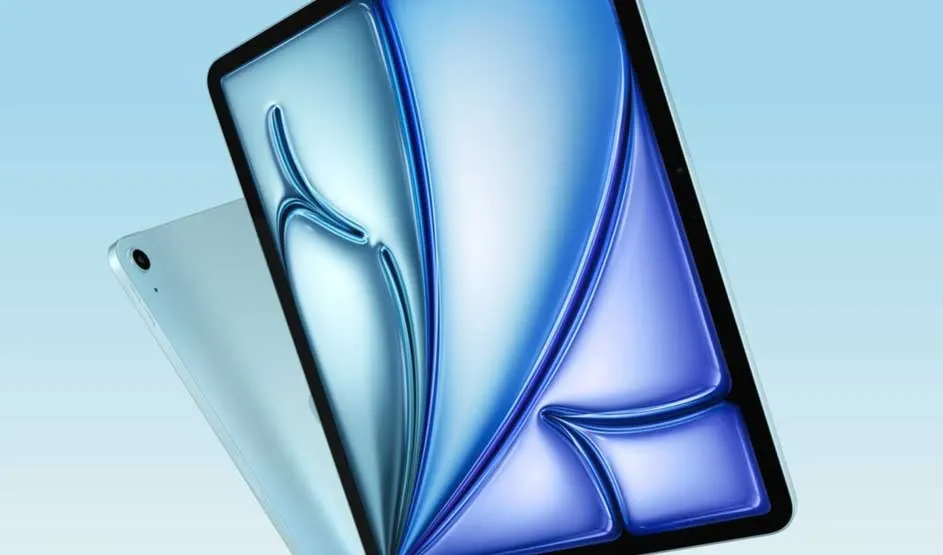
Light blue tablet with large screen shows shiny abstract blue design, leaning over second tablet on soft gradient background.

Every iPad has its advantages and disadvantages. The most important thing is to determine what you want to use the iPad for, for example for work, leisure or study. This way you always have access to the right features and also pay the right price. Still, this can sometimes be quite difficult. This is mainly because the iPads are becoming more and more alike in terms of features. To help you, we have, for example, compared the iPad Air vs iPad Pro and iPad Air vs iPad with each other. This way you can read in detail what the main differences are.

Which iPad should you choose?

These articles may also be interesting for you